
If there’s one constant thing about website security, it’s that the game changes daily. Cybersecurity services are needed to offset the sophistication of hacking tools and the ever-growing skills of the people who use them for nefarious purposes.
They have an uncanny ability to find and exploit the tiniest vulnerability within software.
Contents
Website Security Audit & Implementation
I look beyond plugins to the server and header levels to provide “Defence in Depth” that basic security tools miss.
Security Audits
$350
Full audit of your current website security posture, from the hosting account cPanel, to web application firewall, and brute force login protection. Plugin threat analysis and more… NZ$350 with full rebate if you select my service.
“Assess your Security Threat“
Cloudflare Setup
From $450…
Transition your domain nameservers, implement and check the DNS records. Configure robust custom security rules against main attack vectors. Build cache rules for optimal performance. There is a $450 setup fee for a basic WordPress site. Woo Commerce sites are priced on complexity.
“Implement Enterprise Security“
Monthly Packages
From $99 per month.
Firewall event monitoring, reporting, security rule adjustments, vulnerability assessment. This INCLUDES the Cloudflare WP APO (WordPress automatic program optimisation). You get security AND improved load speed. Full performance optimisation plus a Cloudflare Pro plan is an option.
“Monthly Site Security“
What I do…
- Assess the website’s weaknesses and plan remedies.
- mplement robust onsite cybersecurity measures.
- Web Application Firewall (WAF)
- Brute force login mitigation
- Two-factor authentication
- Setting Security Headers
- Deactivating XML RPC
- Keeping WordPress core files, plugins, & themes up to date.
- Scanning your website for malicious code injections daily.
- Backing up files and the database daily.
- Implementing Cloudflare security rules.
Contact Ben Today
My website security services are primarily for self-hosted WordPress installations. That’s due to it being the world’s leading content management system, with over 810 million installations worldwide (over 40% of all websites). I’ve been working with WordPress on a daily basis for over 20 years, and I can implement proactive measures to prevent known issues from arising by installing protective systems for you…
I’ve worked on WordPress Attacks for over a decade
Many of my annual maintenance plan clients originally came to me in panic and despair because their websites had been hacked. They searched online for help and contacted me from this website or from my WordPressTechSupport.co.nz website.
Some illustrative “Case Study” examples include:
Over my 20+ years of experience working with WordPress, I have progressively refined a series of 10 steps to harden and protect a website. Every website I add to my portfolio has those steps applied to it – and none have ever been breached. I’ve been contacted by several NZ website designers, in despair because they’ve been spending an inordinate amount of their time protecting client sites. Incessant attacks and repeated hacking. I’ve taken on every one of these website maintenance outsourcing referrals without hesitation, but with some preconditions in terms of what we absolutely must do to fix the situation.
Security Risks
Risks are always present and occur from internal sources through weak passwords, poor site management, and outdated server and/or website software. The external bad actors are always actively launching attacks 24/7. They WILL get to yours eventually, be ready! Proactive WP vulnerability scanning makes sense, and daily scans of your site will highlight potential problems fast.
Server Attacks
Attacks come in several forms, including brute force logins, exploits targeting known or new vulnerabilities in server software, poor server configuration or improperly configured firewalls. Phishing attacks seek to fool people into unwittingly divulging passwords. Secure WordPress hosting can male a difference – but that means cPanel hosting rather than the one-size-fits-all styl of WordPress hosting.
DDoS
Distributed denial of service attacks are becoming ever more common. Bad actors sell DDoS services to businesses wanting to ruin a competitor’s business. Launching such attacks at peak sales times cripples the site. I have expertise and solutions for DDoS mitigation services…
Recommended DIY steps to secure a website
I do website repairs almost daily, undoing the damage done by hacking attacks. On this page, I’m talking about proactive security measures to be put in place before an attack occurs. including:
Level 1: A clean small business site with no previous history of malicious attacks.
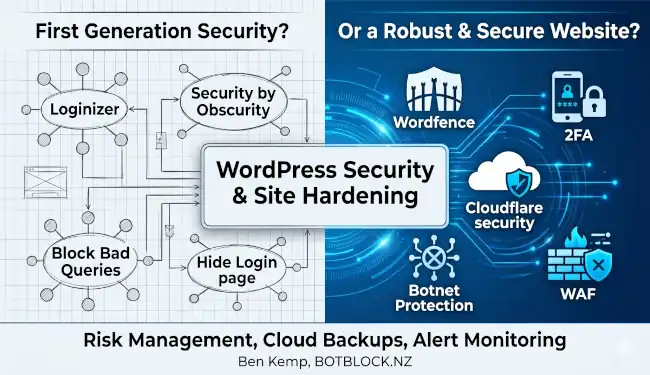
- Web Application Firewall: In my experience, the fast and lightweight Block Bad Queries plugin stops troublesome visitors in their tracks.
- Limit Login Attempts Reloaded or Loginizer – to ensure the bad guys don’t get unlimited time to fiddle behind the scenes, trying to crack a username and password combination.
- Malcare or Sucuri: To scan core WP files, plugins and themes.
- Asset Cleanup – which improves load speed and has an option to disable XML RPC
Level 2: A site which is either under attack or has previously been breached.
- Wordfence: Provides a firewall, brute force login protection, strong password enforcement, 2-factor authentication plus WP core, theme and plugin scanning and file comparison verified against the WordPress repository.
- Cloudflare: a free Cloudflare account will screen a lot of the “noise” before the attackers even reach your website.
- Asset Cleanup – which improves load speed and has the very important option to disable XML RPC.
- Place WordPress in a subdirectory to defeat automated script-based hacking efforts
All sites…
Backups of files and databases are automatically scheduled, and files are uploaded to secure off-site Cloud storage.
As well as proactive measures, we implement a good Database and File backup regime for your site and update all software as soon as new versions are available. In the less likely event that a compromise occurs and content is lost, we are able to recover/restore from the backups.
Cloudflare is also a very good option for both enhanced security AND faster page load speed. I have years of expertise and experience in using Cloudflare on scores of sites, and I do recommend it.
If you’re an NZ or Aussie business, when sourcing your website hardening, NZ-based services are generally your best option. When you’re under pressure and stress, dealing with a man who speaks fluent “Kiwi” is comforting…
“A security plugin is a good start, but true safety comes from hardening the entire environment. I build walls that hackers can’t easily climb.”
Ben
Page last updated on Wednesday, June 24, 2026 by the author Ben Kemp