
Contents
- 1 I keep your site online when it matters most!
- 2 Security Audits
- 3 Cloudflare Setup
- 4 Monthly Packages
- 5 Get in touch today!
- 6 Professional Attack Shielding for NZ Small Businesses
- 7 The Solution: Active Shielding for Small Business Websites
- 8 Simple, Transparent Pricing
- 9 When Your Site is Under Siege, You Need a Specialist
- 10 Professional DDoS Mitigation & Systems Recovery
- 11 Priced for Peace of Mind
- 12 Get in touch with Ben today…
- 13 The Point of Difference: 20 Years of “Battle Scars”
- 14 Written by Ben Kemp - WP Security Consultant
I keep your site online when it matters most!
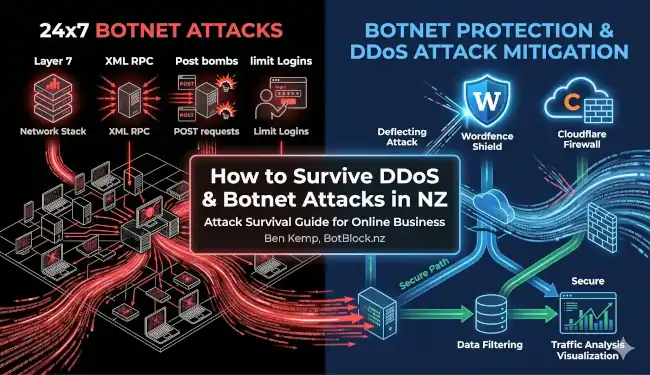
In the 20+ years I’ve been looking after websites, I’ve seen it all. A DDoS attack isn’t “a bit of a technical problem.” It is a deliberate flood of fake traffic specifically designed to knock your online business off its foundations. And when your site goes down, you’re losing money and trust!
Security Audits
$350
Full audit of your current website security posture, from the hosting account cPanel, to web application firewall, and brute force login protection. Plugin threat analysis and more… NZ$350 with full rebate if you select my service.
“Assess your Security Threat“
Cloudflare Setup
From $450…
Transition your domain nameservers, implement and check the DNS records. Configure robust custom security rules against main attack vectors. Build cache rules for optimal performance. There is a $450 setup fee for a basic WordPress site. Woo Commerce sites are priced on complexity.
“Implement Enterprise Security“
Monthly Packages
From $99 per month.
Firewall event monitoring, reporting, security rule adjustments, vulnerability assessment. This INCLUDES the Cloudflare WP APO (WordPress automatic program optimisation). You get security AND improved load speed. Full performance optimisation plus a Cloudflare Pro plan is an option.
“Monthly Site Security“
Most basic WP security plugins stop simple hacking attempts right at the ‘front door‘ of your website. However, they cannot handle an aggressive botnet or even a small “Distributed Denial of Service” (DDoS) attack. That requires good hosting and an enterprise-level “security umbrella” like Cloudflare to be implemented by an experienced consultant on your site.
These malicious attacks flood your server with thousands of fake visitors all at once. This literal flood of traffic overwhelms the ability of the server to respond to all of the requests, drowning it in the process.
From the outside, your website appears to lock up and your business goes “dark.” As that’s happening, it’s not unusual to experience a literal database table “crash” where records are corrupted.
This requires a table “repair” followed by table “optimisation” to get the site working again. It’s an ugly situation and dealing with it is not for the faint of heart.
Get in touch today!
When “Standard” Security Isn’t Enough, You Need
- A good understanding of the technical “mechanics” behind the server crash
- A road map to both undo the database damage and terminate locked processes
- And a solid plan to minimise wasted server resources and maximise available resource to handle the extra load.
Professional Attack Shielding for NZ Small Businesses
I don’t just put up a digital “keep out” sign. I will build you a fortress. My DDoS mitigation services focus on:
The Solution: Active Shielding for Small Business Websites
My dedicated Botnet Protection & DDoS Mitigation services are not based on a magic bullet style “set and forget” plugin; they’re an active botnet defence system backed by my 30+ years of technical IT experience.
Simple, Transparent Pricing
I believe in keeping things affordable for Kiwi small businesses. If you already have a WMS NZ site maintenance package, you can add professional DDoS mitigation to your existing plan for a flat monthly fee – price on application, but we need to implement Cloudflare ($450) and add $60 to $150 per month depending on site complexity.
- Standalone Emergency DDoS Mitigation: Charged at $150 per hour for new clients with a website currently under sustained and intensive attack and needing immediate rescue. Usually 8 to 12 hours work is required to stabilise the situation, depending on the website configuration. A standard WordPress site is easiest to resolve, and E-commerce sites usually take longer due to the complexities.
When Your Site is Under Siege, You Need a Specialist
If you’ve ever seen a WooCommerce store crawl to a halt during a massive DDoS attack, you know that a standard security plugin is like bringing a toothpick to a gunfight. Recently (Sat 28 Feb 2026) I spent 14 hours straight fighting off a botnet for a client—resetting the server, unjamming task queues, and manually rewriting firewall rules every hour as the attackers changed tactics. By late on Sun 1 March, we had the server fully functional, task queues and cron jobs ticking along, Woommerce sales and subscription renewals operating and emails flowing again.
Since then, the DDoS attacks continued unabated! But we have reduced our ‘attack surface area” and applied BLOCK to all unauthorised efforts to access any sensitive file or directory. Weeks later? The botnet is still trying to take the website down, but the website is resilient and continues to hold the line – and we continue to find ways to make it more resilient.
Professional DDoS Mitigation & Systems Recovery
This service is for mission-critical NZ websites that cannot afford to be offline for even a minute. I don’t just “install a plugin”; I take over the technical management of your entire security stack.
- Cloudflare Security Hardening: I spend the initial 4+ hours custom-building your “Shield” with specific Security Rules tailored to your traffic profile and the emerging threats.
- Active Log Analysis: I perform daily (or hourly during attacks) firewall log file reviews to spot and block new botnet patterns.
- Full-Stack Recovery: If an attack locks up your VPS or scrambles your PHP processes, I’m the one in the back-end either reviving the server or calling the shots for the hosting company’s Tech Support staff to get your WooCommerce sales and emails flowing again.
- Zero-Downtime Goal: My focus is on keeping your sales, membership subscriptions, checkout functions, and emails working perfectly, even while the attack is peaking. This is stressful and challenging, but I’ve had a fair bit of practice at it over the years..
Priced for Peace of Mind
Because of the intensive manual labour involved, long hours and pressure, this service is priced to reflect the level of expert oversight required.
Option 1: Managed DDoS Protection
Proactive Uptime Protection: $200 – $499 per month:
The cost depends on website complexity. This is proactive work to prepare your website for an attack. We will proceed over a series of monthly stages, systematically addressing the highest-priority areas one by one.
Stage 1: Web Application FirewalI:
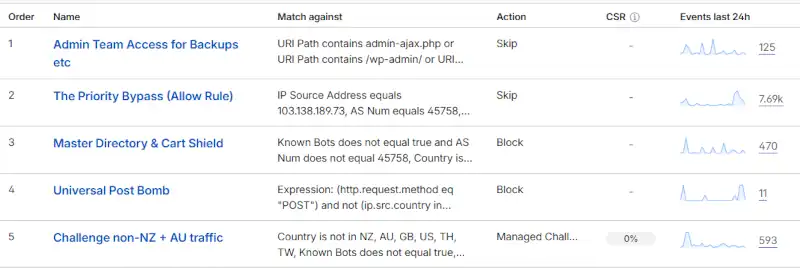
I get you onto Cloudflare and write the firewall Security Rules expressions. I reduce the attack surface area by eliminating all the unnecessary DNS settings. I will harden the server by blocking all efforts to attack it via the IP Address.
Stage 2: Server Performance & Resilience:
A premium hosting plan is important for a business-critical website. You need at least 4Gb of RAM, very fast NVMe drives, Redis object caching and preferably Litespeed Server. A good VPS is helpful because it separates your activity from that of other users on the same server.
Stage 3: Website Performance:
You need to take a hard look at the plugins you are using and be ruthless about things that burn excessive resources. Some are only there because of laziness. For example, Google Sitekit loading stats, because people are too lazy to open Google Analytics and Adwords. For WordPress, Asset Cleanup can be used to unload all code not used on each page. WP Rocket Cache (with pre-loading off) and Super Page Cache (preload on) are a good combination to generate smaller, faster pages that Cloudflare can efficiently distribute to the Edge. Add the Redis plugin for persistent object caching, and you’ve got a stack that works very efficiently indeed.
Woocommerce needs to be running HPOS (the high-performance order system) – for which the InnoDB database format is a prerequisite! InnoDB is a row-locking database, compared to the vastly slower MyISAM table-locking database. This combination makes the site very fast, and it becomes significantly more difficult for a DDoS attack to crash a table.
Stage 4: Origin Server Load Reduction:
Enhancing the website’s caching ability (above) helps maximise the percentage of cached content that Cloudflare serves. This requires implementation of a set of Caching Rules that gets your “Percentage Cached” as high as possible. Instant page delivery in Auckland, Sydney or London with minimal origin server interaction.

Option 2: DDoS Attack Mitigation:
Emergency Attack Recovery: a 10-hour retainer to get started.
This is for sites currently under active attack needing immediate rescue. It involves ALL of the Option One steps to be performed whilst “under fire.”
In the February 27 to March 1 DDoS attack referenced above, I put in approximately 30 hours very hard work under fire in 3 days. We had already begun working on the site 2 weeks prior because of previous low-intensity DDoS attacks. At that stage we had found and fixed a cascade of site issues, upgraded to InnoDB, implemented HPOS, and had basic Security Rules in place.
What happens if your WP Woocommmerce sales site comes under a heavy and determined DDoS attack by an adversary determined to knock you offline, and you are not prepared?
You can expect from 10 to 30 hours of billable time to stabilise the situation, implement Security Rules, and get the server revived and resilient enough to function. That’s the cost to get the site functional under attack.
- On top of that, if your hosting is inadequate, you may need to migrate the site to a VPS, implement Redis etc.
- Switching to Woocommerce HPOS cannot be done immediately: first, all orders need to be synchronised with the new 4-table HPOS system, and then both old and new table structures will be operated in dual mode for a week.
- The total cost to your business depends on the total “technical deficit” you are operating in. How backward is your site right now? Has any preventive work ever been done?
“Today, anyone can rent a botnet for less than the price of a coffee and launch a distributed denial-of-service (DDoS) attack that cripples an entire organisation in minutes. According to new data featured in RedShield’s Contemporary DDoS and Bot Protection whitepaper, DDoS-for-hire services typically cost just US$5 to $7 per hour. Meanwhile, the average business stands to lose around US$234,000 in downtime, recovery costs, and lost revenue.”
Get in touch with Ben today…
The Point of Difference: 20 Years of “Battle Scars”
When you’re under a massive attack, you don’t want a “support ticket.” You want the guy who has been doing this for 20+ years and knows how to unjam a cron job while a botnet is slamming on the front door.
I’m a real kiwi, raised at Lake Brunner on the West Coast of New Zealand’s South Island. I don’t operate a faceless global helpdesk. When you sign up for my security services, you’re getting three decades of “in the trenches” IT management experience, and 21 years of hand’s on WordPress expertise. I handle the complex security stuff so you can get back to what you do best—running your business.
“A DDoS attack is a war of attrition. I’ve spent the last three decades learning how to win those wars so my clients don’t have to lose a single sale.”
Ben Kemp, WMS NZ.
Page last updated on Wednesday, June 24, 2026 by the author Ben Kemp